Posts

How to Fake GPS Location on Android

Image
Android is popular because of many reasons and the availability of wide range of free apps is one of them that helps any kind of user to get more out of the mobile. Android mobiles are comparatively cheaper than iOS but still it is pretty good it terms of apps, features and all. However, sometime, we need to install an app or browse some sites those are actually unavailable in our country. For instance, suppose you want to open Spotify or install Pokemon GO on your mobile. If you get the examples, you might have found that those two things are not available in all the countries across the globe. Obviously, VPN is a great option that you can opt for in order to bypass regional limitations. However, you can also fake GPS location on Android to install country specific apps or browse blocked websites from anywhere in the world. The advantage of using fake GPS location app over VPN is you won’t get any bandwidth limitation, which is a major factor in VPN or Virtual Private Network. Ma...

How to Avoid Fake Download Buttons?

Image
Have you ever been disturbed by fake download buttons? If you have a habit of downloading cracks or torrent files, I bet you have been. Most of the fake download buttons lead you to completely unrelated web pages, maybe a scam or malware. That’s why you should be extra vigilant to spot and avoid fake download buttons. How to Avoid Fake Download Buttons? Avoiding fake download buttons is not a sweaty task. You can do it in the matter of seconds with simple logics. You can read a few tips to identify and avoid them. #1. Examine the Download Buttons If you see a beautiful download button in front of you, you must be vigilant because 80% of the times you will end up visiting a shi**ty site. Moreover, you see a special symbol at the top-right corner of the ad (as in the image) for Google’s ads. That’s how you can spot it in one way. Google gives you an option to report ads so that you will never see the same ever again on any website. #2. Lookout for a Plain Download Li...

How to Disable App Notifications in android mobile phone?

Image
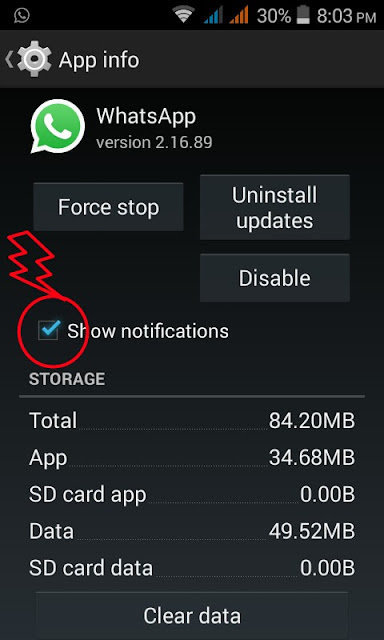
Bugged by annoying app notifications that just keep coming?   If you don’t know already, these app notifications also drain your phone’s battery.   If you want to turn them off, and you are on Jelly Bean 4.1 and above, here’s how: On any of your unwanted notifications in your notification bar, long press on the notification for a message box to appear. Tap on App Info > Untick Show Notifications > OK.

How to Set Mobile Data Limit in android mobile phone?

Image
Want to keep track of how far your usage is from your monthly mobile data limit? If you have ICS and above, there is a feature which lets you keep track of how much of the quota you have left. Head over to Settings > Data Usage. Set your data limit by dragging the orange line to reflect your monthly quota. Set your data usage cycle based on when your "month" starts and ends, and you’re done. You will be alerted once you hit the limit you have set. Note that the tracked data usage of your phone may vary slightly than your carrier’s tracking.

How to Add Multiple Google Accounts in android mobile phone?

Image
You need a Google account to use an Android phone but did you know you can choose to run more than one Google account on your Android device. This is convenient if you use more than one account for several of your Google services. To add multiple Google accounts: Go to Settings > Add account. Select Google and setup your New or Existing Google account. Once added, choose what you want to sync with the account. Repeat all the steps above if you want to add more accounts.

How to Disable automatic App Updates in android mobile phone?

Image
Prefer to read through app permissions and manually pick which app updates to adopt? You can, but first you need to disable your automatic app updates. Here are the steps: Open Play Store and head over to Settings. Tap on Auto-update apps. Choose Do not auto-update apps. If you want to enable the auto updates, follow the same path and choose Auto-update apps at any time or via Wi-Fi(available for certain Android devices only). To update your apps manually, just open Play Store, and on the main page swipe in from the left and tap on My apps. You can tap on apps with pending updates and update them manually, or if you like to update them all at once, just tap on Update All.

How To Check For android System updates in android mobile phone?

Image
For Android users that are using stock ROM, you may want to look for new updates to your system. To check for updates: Go to Settings > About phone/tablet. Tap on System updates. Tap Check now to look for system updates.