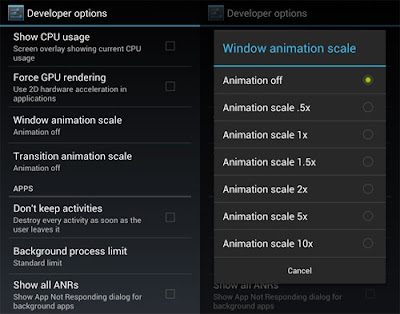
Here’s a tip on how to make your Android device run a bit smoother: disable its animations. You will need to have access to Developer Options which can be found under Settings orAbout device. Note: For some phones, you may need to go to Build numberand tap on it repeatedly until you see "You are now a developer!". Developer options are now enabled. Under enabled Developer options, look for Window animation scale, Transition animation scale, and Animator duration scale. Then, turn them off (disable) them one at a time.
Hello Guys, Thanks for landing on “About Page” on this " GUJARATI BOY " Blog we are writing articles about Blogger tricks, Mobile Apps, Hacking tools, Social networking, Media News and many more things which you need to know, so keep visiting on this blog and help us to improve this blog.. Thank you friends.
idea Welcome to idea 4G What's New Idea brings direct carrier billing on Google Play Idea provides 230% additional capacity to Jio QoS for customers, top priority Idea announces more data on 4G, 3G BIG Internet Packs Proactive expansion by Idea of Jio “Points of Interconnect” to handle over 6.5 million subscribers Idea completes Pan-India Wireless Broadband Footprint Enjoy a variety of Value Added Services. Astrology, Bollywood, Cricket, Devotional and much more. Fill up your personal information Activate All New idea 4G plans on your prepaid card Mobile Number Gender Male Female Birth Date Day 1 2 3 4 5 6 7 8 9 10 11 12 13 14 15 16 17 ...

Comments
Post a Comment